OnSumoTools

Free SEO Checker for SEO, AEO & GEO

Find what needs fixing on your page. Check titles, headings, links, images, and crawl settings, then download a report you can work through.

How useful was this report?

Run a check first, then rate or update your rating.

Scope: one page, first 1.5 MB of raw HTML, 12 s limit. Tests up to 10 links and a few sitemap files. Raw HTML only (no JavaScript rendering). Speed is measured separately by Google. Some sites block automated checkers. Scores show HTML signals, not Google rankings.

Checks public web pages. No sign-up or AI required.

Successful URL checks are saved (without query strings). The latest 10 sites and their results appear publicly below.

Last 10 checked sites

Latest ten checked sites, saved in our database
SiteScorePassedWarningsCriticalLast checkedReport
https://onsumo.com/100/1003600Nov 6, 2026
https://example.com/55/1001371Nov 5, 2026
https://example.org/55/1001371Nov 5, 2026
https://aiproposer.com/76/1002430Nov 4, 2026-
https://joobzi.com/68/1002450Nov 4, 2026-

How this tool works

Enter a page URL and we check its HTML, crawler rules, and sitemap. The report groups findings by topic, explains what needs attention, and lets you download a copy. No AI is involved in running the checks. Content loaded later by JavaScript may not be included.

Read the full methodology

Worked example

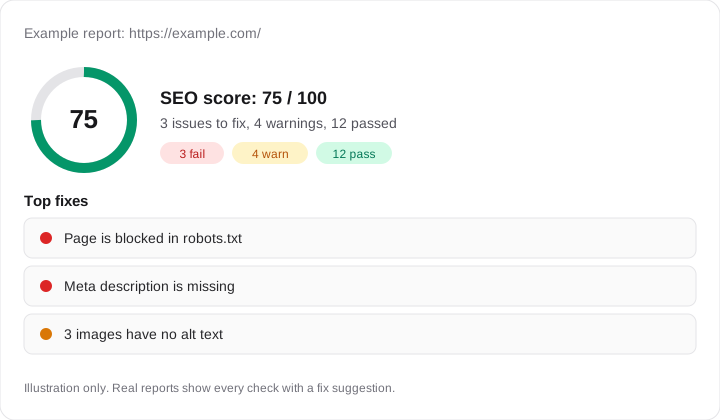
A page may load normally for visitors but block search engines in robots.txt. This report flags that rule so you can investigate it first. Other findings, such as a missing description or unclear headings, appear in their own sections with suggestions you can work through.

Example OnSumo SEO report showing a score of 75 out of 100, 3 failed checks, 4 warnings, 12 passed checks, and a top fixes list: blocked in robots.txt, missing meta description, images without alt text.

What the audit covers

Indexability and canonical signals
robots.txt and sitemap.xml discovery
Title and meta description quality
H1, H2, and heading order
Visible content depth
Internal links and anchor text
Image alt text and layout hints
JSON-LD structured data
Open Graph and Twitter/X previews
HTML size and blocking script hints
AEO and GEO answer-readiness signals

AEO and GEO checks explained

AEO (answer engine optimization) and GEO (generative engine optimization) help AI answer tools such as ChatGPT, Perplexity, Claude and Google AI Overviews find, read and understand your page. These checks run on top of the normal SEO audit. They are rule-based and use no AI.

  • AI crawler access

    Reads your robots.txt and tests whether GPTBot, OAI-SearchBot, ChatGPT-User, ClaudeBot, Claude-SearchBot, Claude-User, anthropic-ai, PerplexityBot, Google-Extended, CCBot, Applebot-Extended, Bytespider, Diffbot, cohere-ai, FacebookBot and Omgilibot may fetch this URL. Blocking them is fine if you choose it. Note that robots.txt controls access, not whether your page is mentioned.

  • Answer-ready sections

    Looks for FAQ schema or question-style headings. Short questions with direct answers are easy for answer engines to quote.

  • Entity context

    Checks for Organization, WebSite, app or Article schema. This tells machines who owns the page and what it represents.

No tool can promise that AI products will cite your page. These checks cover what you control: access, structure and clear identity.

Frequently asked questions

  • What does the On-Page SEO Checker test?

    It checks indexability, title tags, meta descriptions, canonical tags, heading structure, visible content depth, internal links, image alt text, JSON-LD schema, social preview tags, HTML size, blocking scripts, and answer-engine readiness signals.

  • Does this on-page SEO checker use AI?

    No. The checker uses deterministic HTML inspection and scoring. AI can still be used later to prioritize fixes, but the crawl and checklist itself do not consume AI tokens.

  • Can I check any website?

    You can check normal public web pages that return HTML over http or https. Private network URLs, localhost URLs, credentialed URLs, and non-HTML files are blocked for safety.

  • Will a high score guarantee rankings?

    No. A high score means the page avoids common on-page problems. Rankings also depend on search intent match, content quality, topical authority, links, technical performance, freshness, and competitive difficulty.

  • How does this help AEO and GEO?

    The checker looks for clear question-answer sections, structured data, and entity signals that can help answer engines and generative search systems understand who owns the page and what answer it provides.

A good score is a useful starting point, not a ranking guarantee. Your content, competition, site performance, and links still matter.

Related tools

A first pass, not a verdict

Paste a public URL and the checker reads the page the way a crawler would. It reports on what it finds, then gives you a list of things to fix, ordered by how much they matter.

It doesn't use AI to judge your writing. It checks facts: is the page indexable, is the title there, are headings in order, do images have alt text. Those are things a tool can verify.

What it checks

  • Indexability: status code, robots meta, canonical
  • Metadata: title and description length and presence
  • Headings: one H1, a sensible outline
  • Links: internal and external counts, broken anchors
  • Images: alt text, size hints
  • Schema: JSON-LD found and parsed
  • Social: Open Graph and Twitter tags
  • Answer engine signals: clear questions, direct answers, structure

AEO and GEO signals

Search is moving toward answers. Pages that state a clear question and answer it near the top, use lists and tables where fitting, and carry schema are easier for answer engines to quote. The checker looks for those traits.

It can't promise you'll be cited. It can show you what's missing.

A high score isn't a ranking

A page can pass every check and still lose to one that answers the question better. The tool can't tell if your content is good. Read the findings with your own judgment, then ask the harder question: would I want to read this?

How to use it

Run it on pages you edited, after each release. Fix errors first, warnings next. If a page is blocked from public access, it can't be checked. Nothing you type is stored.

Reading findings in order

Not every warning matters equally. Fix blockers first: a noindex tag you didn't mean to add, a canonical pointing somewhere odd, a page that returns an error to bots. Those can remove a page from search entirely.

Then look at titles and descriptions, headings, image alt text and internal links. These are the everyday improvements that help clarity for both people and search engines.

Last come the extras: structured data, social tags and signals for answer engines. They help, but only after the basics are fine.

A sensible workflow

Run the checker on one page, make a handful of changes, then run it again. Don't chase a perfect score on every page. Spend your time on the pages that bring in or could bring in visitors.

Compare against a competitor's page too. Seeing what a top result includes that yours doesn't is often more useful than the score itself.

Keep a short log of what you changed and the date, so you can link movements in traffic to your edits.

The checker fetches the public page you enter. It can't see content behind logins, and it doesn't replace reading your pages the way a visitor would.

  • Check indexability first
  • Fix titles and descriptions next
  • Review headings and links
  • Add structured data where it matches the page
  • Re-test after each round of edits